UI UX Design
Commonwealth Bank - 2021

Why CommBank?
I had just created a Commonwealth bank account and was ready to download the app. I installed it, opened it up and logged in. The first thing I was greated with was a yellow blank screen only reading "Hi Max". Where was I to go from here, what am I meant to do with this big yellow square now on my phone.
After using the app for a little bit i started to notice a few different problems. That big blank yellow screen was reserved for notifications, which personally when I sign into a banking app isn't the first thing I want to see. Further visually and functionally CommBank's app wasn't consistent. The accounts screen for example has a blurred photo of the beach as the backdrop to your accounts. Not only that but all the buttons are moved around, to me it feels like they are two seperate apps linked together.
Core design and goals
After identifying the issues within the app, my goal is to layout the core design idea and concepts that will lead the project. The core design concepts I settled on were.
- User centred design focusing on consistency between screens visually and functionally.
- Create a clear colour palette in line the CommBank's brand identity.
- Present the most important information to the users
Results
After completing the design of the CommBank app I believe the layout of the app is much clearer and consistent. After testing the prototype I found that the button placement was much more consistent after the changes. Further I asked for feedback on the overall design and recieved overwhelmingly positive feedback on the visual changes.
App wireframes

With the completion of the wire frames designed in Figma. I have created a interactive prototype through InVision. The prototype allows users and myself to gain further understand of the apps flow.
Further an interactive prototype aids in identifying and correcting any flaws found. Whether that be navigational issues or visual elements, interative with the app in full creates a whole experience.
Night themed games company creative direction - 2021


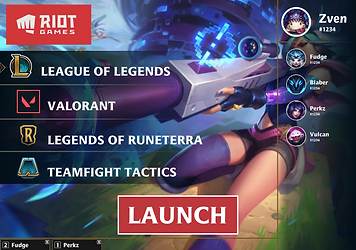
Riot client - 2021



Judgement - 2019
Judgement is a social deception board game where players need to convince the Judge who the murderer is in the group whilst maintaining innocents. At the end of the round the Judge player chooses 1 person from the group to be executed if the Judge correctly executed the murderer the Innocent team wins, however if they Judge executes the wrong person the Guilty team wins.
The game sessions last around 5 minutes and each round players redraw cards, there is a narration companion app to narrate the players powers during the sleeping phase and count the time in the rounds after the game begins.
Print and play
The first version of Judgement is available for download as an APK for android online as well as a print and play version of the cards and rules. Click the link below or scan the QR code to access the download folder.

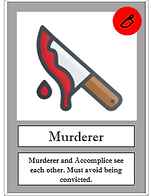
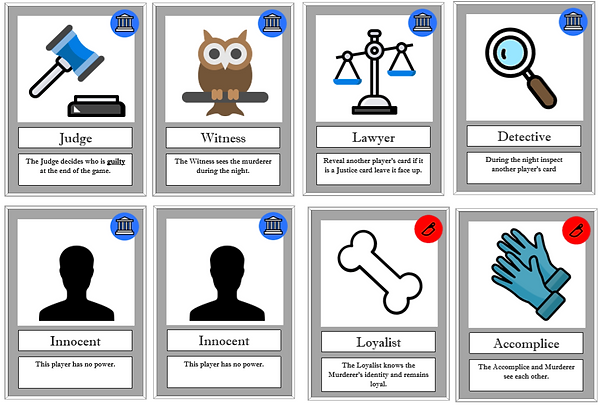
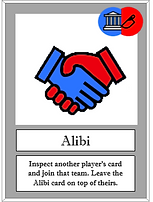
Rules and gameplay
Judgement is a social deception game where players need to lie to each other to convince the group and most importantly the Judge who is who and where each player’s allegiances lie. Before the game begins each player draws a card with a unique power which will be used in the night phase, these powers include inspecting other players cards, seeing specific players roles and even choosing a side.
Judgement is a game that runs in two phases, the first phase often called the night phase, is a phase where players close their eyes or sleep until their specific role cards power is activated. The narrator on the companion app will read out each roles name and instruct them to use their powers, at this time the called players may open their eyes and do as their cards power instructs. After all the player card powers have been used the narrator will call for all players to wake up and begins the second phase.
At the beginning of the second phase the Judge player will reveal their card for all players to see and leave it face up. Now the timer beings and the players may begin discussion in order to convince the Judge who is guilty and who is innocent.
Finally after the allotted time has concluded the Judge will decide who is guilty and convict the player they have chosen, the chosen player then reveals their card if the card is a Justice card the Guilty team wins, however if the card shown is the Murderers card the Justice team wins.
Companion app
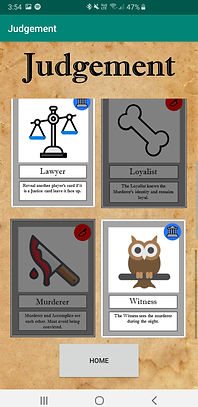
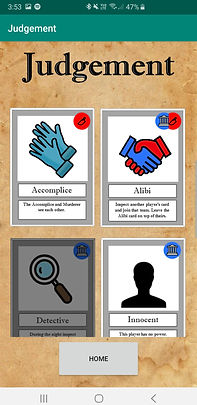
Judgement come with a companion app ready to narrate the game rules for you and your friends so no one has to miss out on playing the game to narrate. The companion app allows the user to select and deselect which cards will be used during the game as seen below, additionally the app counts down the discussion timer after the narration phase has ended.
The companion app was created using Android Studio written in Kotlin over a 3 week period, the available version is only the first version and has some known bugs and other issues which I will continue to work on when I begin development again.

Bunnings self checkout redesign - 2020
The bunnings self checkout redesign is a project I took upon myself to complete. I've been working with bunnings for many years during this time I have been able to watch users struggle with the current BSCO system. This along with my drive to get into the industry gave me good reason to create a redesign and present it to the managment at Bunnings.
The whole Figma project can be accessed here BSCO Redesign, the below images are the final screens.
Here I have also attached a interactive prototype built in inVision.
